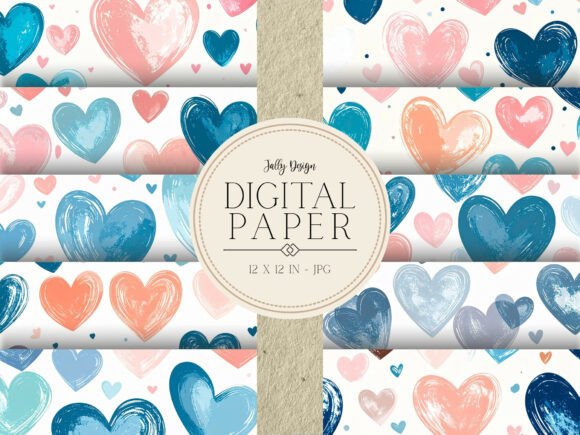
Blue Blush Watercolor Hearts Design
If you’ve ever scrolled through digital design marketplaces searching for soft, romantic, and versatile paper textures—only to land on something too saturated, pixelated, or poorly scaled—you know how easy it is to waste time (and money) on digital papers that don’t deliver. The Blue Blush Watercolor Hearts Design solves that. It’s not just another pastel heart pattern—it’s a thoughtfully crafted set of 12 high-resolution JPG files (300 dpi, 12×12 inches / 30.5 × 30.5 cm), each built with real watercolor texture, subtle transparency, and intentional spacing between hearts so they tile seamlessly—or stand beautifully on their own.
Why creators choose this design—beyond the blush
This isn’t about chasing trends. It’s about having dependable, print-ready assets that work across contexts: whether you’re hand-lettering a wedding invitation, building a brand mood board, designing printable party banners, or adding gentle visual warmth to a blog header. The blue-blush palette—soft dusty rose meeting muted slate—feels modern but timeless. It pairs effortlessly with cream kraft paper, charcoal typography, gold foil accents, or clean sans-serif web layouts. And because each file is delivered as a standalone JPG at true 300 dpi, there’s no guesswork about scaling, resampling, or resolution loss when printing at home or through a professional lab.
A common mistake: Assuming “watercolor” means “ready for everything”
Many designers assume any watercolor-themed digital paper will behave the same way—but that’s where expectations misalign with reality. Some “watercolor” files are actually low-res PNGs with heavy drop shadows or flattened textures that don’t scale without blurring. Others use overly dense patterns that overwhelm small formats like gift tags or stickers. Worse, some packs include only one or two color variations, limiting flexibility across projects.
The Blue Blush Watercolor Hearts Design avoids these pitfalls by offering consistent resolution, balanced negative space, and variation *within* cohesion: some files feature tightly clustered hearts, others use generous breathing room—so you can match density to purpose. A tightly spaced version works beautifully as a background for a full-page greeting card; a looser layout shines on a minimalist sticker sheet or website hero section.
What people overlook before downloading—or worse, before printing
Before using any digital paper pack, check three things—not just the file count, but how those files are structured:
- Color mode: These files are RGB—ideal for screen use (web, social graphics, digital invitations). If you plan to print professionally, confirm your printer accepts RGB or convert to CMYK *after* final layout (not before), to preserve tonal nuance.
- Tile readiness: Not all “12×12” papers tile smoothly. This pack includes files designed with repeat-friendly edges—no awkward seams when used as seamless backgrounds in Canva, Photoshop, or Affinity Designer.
- Transparency handling: Since these are JPGs (not PNGs), they have no transparent background—but that’s intentional. Solid white backing ensures crisp output on physical paper and predictable layering in design software. If you need transparency, you’ll want to mask or erase manually—but for 95% of scrapbooking, stationery, and banner uses, the white base saves time and avoids ghosting on inkjet printers.
Real-world missteps—and how to sidestep them
Example 1: A small business owner orders custom thank-you cards using a free “watercolor hearts” download—only to discover the file is 72 dpi. When printed at 5×7 inches, the hearts look blurry and indistinct. Result: delayed launch, reordering, and lost client trust.
Better approach: Always verify resolution before committing. With the Blue Blush Watercolor Hearts Design, every file is confirmed 300 dpi—so whether you’re printing a 4×6 photo card or a 24-inch banner, clarity holds.
Example 2: A teacher designs classroom Valentine’s Day posters in Canva, uploads a “hearts” image, and stretches it to fill the frame—distorting proportions and washing out the watercolor grain.
Better approach: Use the native 12×12 inch size as a base. In Canva or PowerPoint, insert the image at 100% scale, then crop or overlay text instead of stretching. Or, use the “Set as background” option—many platforms auto-fit without distortion.
Where this pack truly shines—and where it doesn’t pretend to
This isn’t clipart. It’s not meant for cutting intricate die-cut shapes directly from the file. It’s also not a font or vector pack—so if you need scalable SVG hearts for laser cutting, look elsewhere. But for what it *is*—a cohesive, printable, screen-ready set of watercolor-textured papers—it excels quietly and reliably.
You’ll find immediate value in:
- Scrapbooking: Print on matte photo paper for layered pages with tactile depth.
- Greeting cards & invitations: Combine with elegant serif fonts—avoid overloading with extra embellishments; let the texture breathe.
- Party decorations: Resize a single file to 8×10 for cupcake toppers, or tile across a 36-inch banner canvas.
- Creative stationery: Use in GoodNotes or Notability as notebook covers—or print as letterhead for a boutique brand.
- Web & social: Apply as subtle background overlays behind testimonials or newsletter signup forms (reduce opacity to 10–20% for elegance).
A final note on intentionality
Good design tools shouldn’t ask you to compensate for their limitations. The Blue Blush Watercolor Hearts Design was created with that principle in mind—not as a “more is more” bundle, but as a focused, quality-anchored set built for real workflows. No upsells. No hidden layers. Just twelve files, ready when you are.
We hope you enjoy creating amazing projects ❤️
The Jally Design dream team ❤️