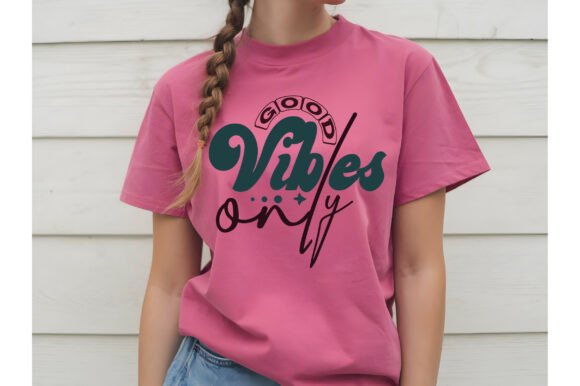
Good Vibes Only SVG: Your All-in-One Digital Design for Effortless Crafting and Printing
If you're a crafter, small business owner, educator, or DIY enthusiast looking to bring positivity and personality into your projects, the Good Vibes Only SVG is more than just a trendy phrase—it’s a ready-to-use digital toolkit designed for real-world results. This isn’t a physical product shipped in a box; it’s a thoughtfully assembled digital download engineered for flexibility, compatibility, and creative control. Whether you’re making custom t-shirts for a wellness retreat, designing motivational wall art for your classroom, or producing branded merch for a boutique shop, this file set puts professional-grade design power directly in your hands.
Many users face common roadblocks when working with digital cut files: inconsistent layering across platforms, color shifts during printing, resolution loss when resizing, or software incompatibility that halts progress mid-project. Others struggle with time-consuming manual edits—rebuilding text layers, re-tracing outlines, or converting formats just to get a simple phrase onto vinyl or cardstock. The Good Vibes Only SVG was built to eliminate those friction points. It arrives pre-organized, pre-tested, and production-ready—so you spend less time troubleshooting and more time creating.
What makes this particular design stand out isn’t just its uplifting message—it’s how intelligently it’s structured. Inside the compressed download, you’ll find four essential file types, each serving a distinct purpose:
- 01 SVG File (Word-by-Layer): Optimized for cutting machines like Cricut Design Space and Silhouette Studio, with each word or element on its own layer—ideal for multi-color vinyl projects, precise weeding, or selective masking.
- 01 PNG File (High-Resolution): Transparent background, crisp edges, perfect for digital overlays, social media graphics, or print-on-demand mockups where vector editing isn’t needed.
- 01 EPS File (Adobe Illustrator Source): Fully editable vector format—scalable to any size without quality loss, with live text and grouped paths ready for customization in professional design workflows.
- 01 JPG File (300 DPI High Resolution): Print-ready for posters, greeting cards, or framed art—no pixelation, no guesswork, just plug-and-play clarity.
This variety ensures you’re covered whether you’re using beginner-friendly tools like Cricut Design Space or advanced suites like Adobe Illustrator. And because every file is aligned and consistently named, switching between formats feels seamless—not stressful.
One of the most practical advantages of the Good Vibes Only SVG is its effortless color adaptability. Unlike raster images locked into fixed palettes, the vector-based SVG and EPS files allow instant, non-destructive color changes. In Cricut Design Space, simply select a layer and choose a new fill. In Illustrator, use the Recolor Artwork tool or adjust swatches globally. Even in Inkscape or Photoshop (with vector smart objects), you retain full control over hue, saturation, and transparency—making it easy to match brand colors, seasonal themes, or client preferences.
Real-world applications are wide-ranging—and highly adaptable. A yoga studio owner might resize the SVG to fit a large canvas tote bag, then recolor it in soft sage and terracotta for their spring collection. A teacher could import the PNG into Canva, add student names beneath “Good Vibes Only,” and print personalized certificates. A wedding planner may layer the EPS file over floral vectors in Illustrator to create elegant signage for a mindfulness-themed ceremony. Because the design is clean, legible at multiple scales, and intentionally uncluttered, it integrates smoothly into diverse visual contexts without competing for attention.
Different users approach the Good Vibes Only SVG based on their tools and goals—and that’s by design. Beginners often start with the SVG in Cricut Design Space: upload, ungroup if needed, assign materials, and cut. Intermediate users lean into the layered structure to experiment with shadow effects, gradients, or mixed-media combinations (e.g., foil + vinyl). Advanced designers open the EPS in Illustrator to expand the layout—adding custom flourishes, integrating logos, or building a full branding suite around the phrase.
Compatibility is another cornerstone. This file set works reliably across major platforms: Cricut Design Space, Silhouette Studio, Inkscape (free and open-source), Adobe Photoshop (for raster-based compositing), and Adobe Illustrator (for deep vector refinement). That cross-platform reliability means you’re not locked into one ecosystem—and if you switch tools down the line, your investment remains fully usable.
It’s also worth noting what’s not included—and why that matters. There’s no physical item, no shipping delays, no inventory tracking. You get immediate access, total ownership, and the freedom to use the files commercially (always review the included license for permitted uses). This digital-first model supports sustainability, speed, and scalability—especially valuable for creators launching limited-run collections or testing new designs before committing to bulk production.
Should you encounter unexpected behavior—like misaligned layers in Silhouette Studio or color rendering differences between screen and print—the creator offers direct support. A quick message connects you with guidance tailored to your setup, not generic troubleshooting. That human-backed assurance helps bridge knowledge gaps, especially for those new to vector workflows or cutting machine software.
To make the most of your Good Vibes Only SVG, keep these practical tips in mind:
- Always check your software version: Newer versions of Cricut Design Space or Silhouette Studio handle layered SVGs more predictably than older ones.
- Use the EPS or SVG for cutting, not the JPG or PNG—raster files lack the precision required for clean cuts.
- When resizing in Illustrator or Inkscape, hold Shift to maintain proportions and avoid distortion—especially important for balanced letter spacing.
- For best print results, open the JPG or EPS in your preferred print utility and confirm color mode is set to CMYK (for professional printing) or sRGB (for home printers).
Ultimately, the Good Vibes Only SVG delivers more than aesthetic appeal—it delivers confidence. Confidence that your files will load correctly. Confidence that your colors will translate accurately from screen to substrate. Confidence that your project will reflect intention, not frustration. In a creative landscape where time is scarce and expectations are high, having a dependable, versatile, and well-structured asset like this isn’t just convenient—it’s essential.
So whether you're crafting for joy, building a brand rooted in positivity, or simply adding warmth to everyday objects, let the Good Vibes Only SVG be your reliable starting point—not an afterthought. Download it, open it, customize it, and create something that feels as good to make as it does to share.