Crumpled Silver Foil Digital Paper
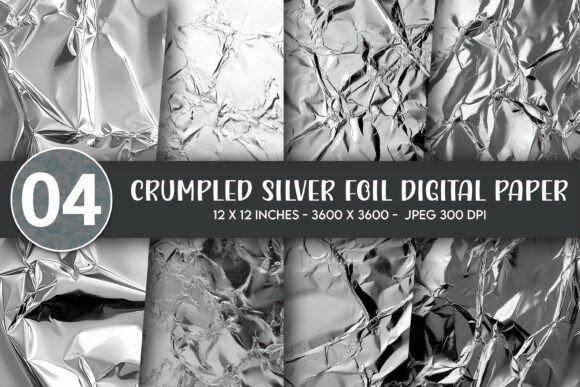
If you’ve ever wanted that luxe, tactile shimmer of real crumpled foil—but without the mess, cost, or shipping delays—Crumpled Silver Foil Digital Paper is your answer. It’s not a physical sheet you unroll on your desk. Instead, it’s a high-fidelity digital texture designed to mimic the reflective depth, subtle creases, and organic irregularity of hand-crumpled metallic foil. Think of it as a ready-to-use visual layer: versatile, scalable, and instantly editable in any design software.
Why This Texture Stands Out
What makes Crumpled Silver Foil Digital Paper more than just another background? Its realism comes from careful photographic capture and thoughtful post-processing—not AI-generated guesswork. Each file captures genuine light play across micro-folds, giving depth and dimension that flat metallic gradients simply can’t match. That means when you overlay text or graphics, shadows and highlights respond naturally, adding instant sophistication to even simple layouts.
The 3600×3600 pixel size at 300 DPI ensures crisp output whether you’re printing a large wall poster or scaling down for a delicate greeting card border. And because it’s delivered as four distinct JPG files, you get subtle variations—different crumple densities, light angles, or tonal balances—so your projects never feel repetitive.
Where You’ll Use It (and Why It Fits So Well)
This texture shines wherever metallic elegance meets everyday creativity. For wall decor and wall art, it works beautifully as a full-bleed backdrop behind minimalist typography or botanical line drawings—adding quiet luxury to a living room, office, or nursery. On posters or framed prints, it elevates event announcements, motivational quotes, or brand campaigns with tactile warmth that feels intentional, not generic.
For apparel and accessories, Crumpled Silver Foil Digital Paper adapts seamlessly. Print it directly onto t-shirts or onesies for subtle shimmer under studio lighting—or use it as an accent layer behind a logo on a tote bag or mug. Unlike foil heat transfers, there’s no peeling, cracking, or minimum order requirement. Just upload, adjust opacity or blending mode, and print on demand.
Stickers and greeting cards benefit especially from its fine detail: the crumples catch light even on small surfaces, making die-cut stickers pop on laptops or notebooks, and giving handmade-style cards a polished, boutique feel. Throw pillows? A soft silver foil base lets embroidery or printed motifs stand out without competing visually. Even educators and freelancers use it—think presentation slide backgrounds, printable planners, or branded social media banners that convey quality without shouting.
Simple, Practical Uses for Beginners
You don’t need advanced skills to start. In Canva, upload one of the JPG files as a background, then drop in text or icons—it auto-scales and looks professional instantly. In Photoshop or Affinity Designer, try blending modes like “Overlay” or “Soft Light” to let the foil texture interact gently with layered elements. For t-shirt mockups, place the texture beneath your design and reduce opacity to 15–30% for a whisper of metallic sheen.
Small business owners love how quickly it helps unify branding. Use the same foil variation across a product label, Instagram story highlight cover, and thank-you card—creating cohesion without custom photography. Bloggers add it as a subtle border around quote graphics. Educators print it on cardstock for laminated classroom resources that feel special, not stock.
Things to Keep in Mind Before You Start
First, remember these are digital downloads only—no physical foil, no shipping, no waiting. You’ll receive a ZIP file with four high-res JPGs immediately after purchase. Make sure your device supports standard ZIP extraction and that your editing software opens JPGs (nearly all do).
Second, while the texture is highly flexible, avoid overstretching it beyond its native 3600×3600 resolution for ultra-large prints (e.g., murals over 48 inches wide). For those, consider using it as a repeating tile or combining it with a complementary solid silver gradient for seamless expansion.
Third, color accuracy depends on your monitor and printer. The files are sRGB-encoded for broad compatibility, but if you’re printing professionally, ask your lab whether they recommend soft-proofing first—especially for metallic-leaning projects where tone consistency matters.
Lastly, think about context. Crumpled Silver Foil Digital Paper adds richness, not flashiness. It pairs best with clean fonts, ample white space, and muted or monochrome palettes. Try it behind charcoal-gray serif type, deep navy illustrations, or creamy off-white photography—it grounds bold choices and refines subtle ones.
Real Projects, Real Results
A freelance graphic designer used one variation as the base for a wedding invitation suite—layering delicate script calligraphy and watercolor florals over it. Clients loved the understated glamour. A café owner printed two versions on matte poster paper for rotating wall art near the counter, swapping them seasonally. A mom-and-pop gift shop added foil-textured borders to their printable greeting cards, boosting perceived value without raising production costs.
Even hobbyists find joy in small ways: a teacher printed foil-backed flashcards for vocabulary lessons; a podcaster used it as a consistent thumbnail background across episodes; a DIY enthusiast applied it to a laser-cut wooden sign before staining—letting the grain show through the crumples for layered texture.
Ready When You Are
Crumpled Silver Foil Digital Paper isn’t about complexity—it’s about giving your ideas a refined, tactile foundation, fast. Whether you’re designing your first Etsy listing or polishing a client pitch deck, it adds polish without pressure. No learning curve. No inventory. Just four versatile, high-resolution files waiting to bring quiet shine to your next project.